Activity Monitor
The Activity Monitor is a live view of a PostgreSQL server built on pg_stat_activity. It shows who is connected, what is running, which sessions block each other, and lets you cancel queries or terminate sessions.
Opening the monitor
In the Database Explorer, right-click a PostgreSQL data source or database and choose Activity Monitor. The action is also available in Find Action (⌘⇧A, Ctrl+Shift+A on Linux and Windows).
The monitor opens as a non-modal window, so you can keep working in consoles while it refreshes.
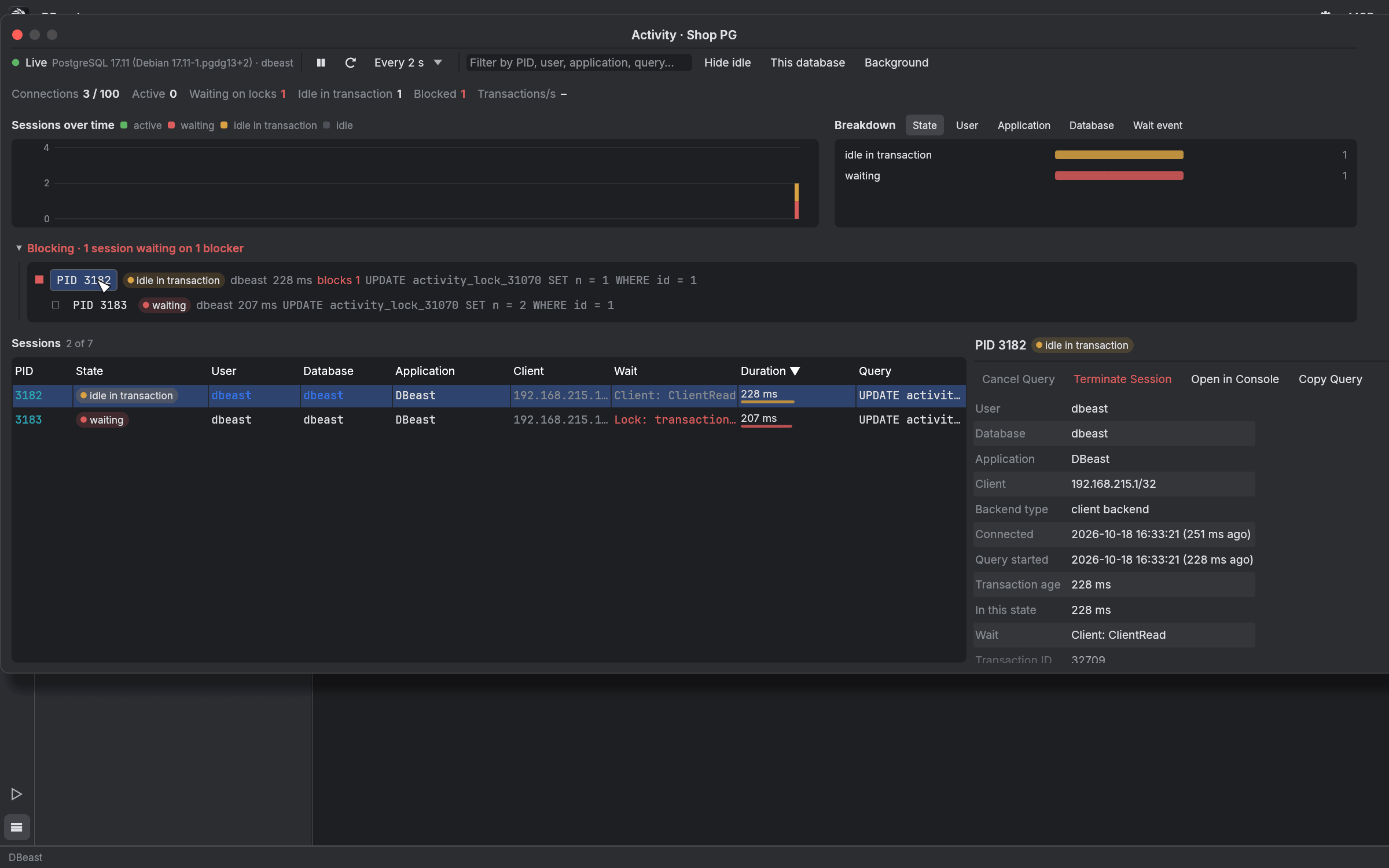
Toolbar
- Live status, server version and database.
- Pause and refresh buttons. The refresh interval is Every 1 s, 2 s, 5 s or 10 s, or you can pause polling.
- A filter field for PID, user, application or query text.
- Hide idle hides idle sessions.
- This database limits the list to the current database.
- Background includes background server processes.
Server counters
A single line under the toolbar summarizes the server:
| Counter | Meaning |
|---|---|
| Connections | Open connections compared to max_connections |
| Active | Sessions running a query |
| Waiting on locks | Sessions waiting for a lock |
| Idle in transaction | Sessions with an open transaction and no running query |
| Blocked | Sessions blocked by another session |
| Transactions/s | Transaction rate with a small chart, computed from pg_stat_database differences; counter resets are skipped |
Only values that indicate a problem are colored: connection usage above 70%, locks, and transactions open for more than a minute. Tooltips give details such as the longest running query and the oldest transaction.
Sessions over time and breakdown
- Sessions over time charts session states (active, waiting, idle in transaction, idle) for the last five minutes. Hover a sample to see its values.
- Breakdown groups sessions by State, User, Application, Database or Wait event. Click a bar to filter the session list.
Blocking tree
When sessions wait for locks, the Blocking section shows a tree built from pg_blocking_pids: each blocker with the sessions waiting on it, their state, duration and query. Click a PID to select that session.
Session list and details
The Sessions table lists PID, State, User, Database, Application, Client, Wait, Duration and Query. Click a column header to sort. Each row has a state badge and a duration bar.
Select a session to see its details:
- the full query with syntax highlighting,
- connection, query start, transaction age and time in the current state,
- the wait event and transaction identifiers,
- who blocks this session and whom it blocks, as clickable PIDs.
Actions for the selected session:
| Action | Effect |
|---|---|
| Cancel Query | Calls pg_cancel_backend to cancel the running query |
| Terminate Session | Calls pg_terminate_backend to end the session |
| Open in Console | Opens the query in a new console |
| Copy Query | Copies the query text |
Cancel Query and Terminate Session ask for confirmation.
Accuracy
- Durations are computed by the server against its own
now(), so a clock difference between your computer and the server does not distort them. - The monitor's own session is excluded from the list.
- If a refresh fails, the last sample stays on screen with a red notice.
- Queries hidden by the server (
<insufficient privilege>) are labeled as such, with a note about thepg_read_all_statsrole that grants access to them.
Polling and load on the server
The monitor is designed to stay light on the server it watches:
- It uses one persistent connection per monitor and two lightweight queries per sample.
- The next sample starts only after the previous one has finished, so a slow server never receives a backlog of queries.
pg_blocking_pidsis evaluated only for sessions that wait for a lock, andpg_locksis read only when some session is waiting for one. Both operations briefly lock the server's lock manager.- A sample has a 15 s timeout. After consecutive errors, the interval doubles up to 30 s.
- A minimized monitor window does not poll the server.
On the client side, the blocking tree, breakdown, summaries and query highlighting are computed once per sample or filter change, and the session table draws only the visible rows.